 Made in Humane Club



Ten sessions in, she stopped waiting for feedback and started giving it to herself. She found the bug, removed the redundant penalty, argued back on the arrow keys, and proposed the better solution. I hadn’t suggested any of it.
The container and what it holds
A variable is a container that holds something and the something can change.
I used a glass. Right now it holds water. Pour it out, fill it with juice. Same glass. Different contents. The container stays. The value changes.
She nodded immediately. “Like score in my games.”
Exactly like score. And time. And energy. And excitement level. She’d been using variables since the construction game. Every game in the series had variables running through it. She’d designed them, named them, tracked them, built penalty systems around them.
What she hadn’t done was name the concept itself.
I asked her to think of examples outside her games. She thought for a moment. “Temperature. The weather changes every day but it’s always temperature.”
Same container. Different value. Every day.
That’s a variable.
She already knew variables. It felt satisfying. The particular pleasure of discovering that what you’ve been doing instinctively has a name. She had that look: not surprise. Recognition
The session’s job was to name it, then build around it.
How she chose what to build
She came to this session differently from any previous one.
No notebook already open with ideas mapped out. No immediate pivot from a wrong first attempt. She sat down, understood the concept in about five minutes, and said: let’s just build something.
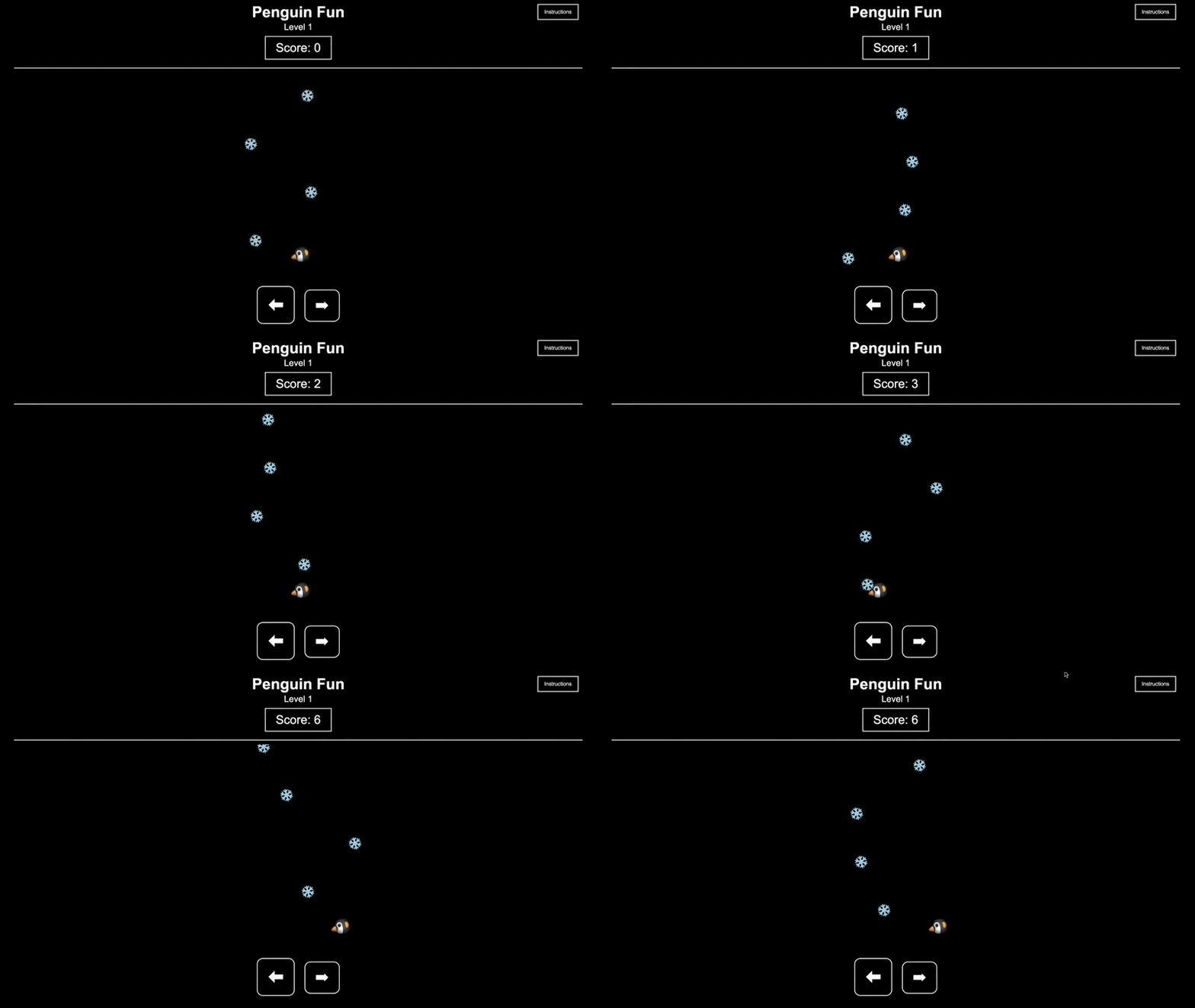
The idea came quickly. A penguin catching snowballs. Score goes up with each catch. Speed increases across three levels. Simple, clean, one variable doing all the work.
She knew exactly what she was doing. The score variable tracks progress. The speed variable changes per level. The player’s job is to keep the score variable climbing before the difficulty variable makes it impossible.
She wrote the design doc and opened ChatGPT in the same session. Half a day and it was done.
The design doc
Penguin Fun

Mission: Guide your penguin to catch the snowballs. Set a high score for yourself.

Variables: Score

Rules for the player: Guide a penguin avatar to catch the snowballs.

Level 1: Snowballs fall slowly. The penguin should be able to catch most of them.

Level 2: Snowballs fall faster. Some difficulty catching them.

Level 3: Snowballs fall fastest. A lot of difficulty catching them.

Instructions for ChatGPT: Single HTML file. Black background, white font and buttons. Title "Penguin Fun" centred at top. Current level written below title. Score shown in a box below title. Thin line below the variables box — snowballs fall from this line. Player moves penguin avatar using left and right arrow keys centred in the game. Each caught snowball adds 1 to score. Score of 10 moves player to next level. Instructions button top right — clicking it pauses the game and shows player rules. Cross symbol closes the instructions panel and resumes the game. Mobile phone design. Play Again button restarts game. Complete all three levels — You Won screen with Play Again button.
The design doc is the simplest in the series. One variable named explicitly. Three levels differentiated by a single changing value: speed. No robots, no Venn diagrams, no unexpected variables with MCD approvals and monsoon disruptions.
That simplicity is the point. When variables are the concept, the game should show variables working clearly, not buried under fifteen other mechanics.
Design → Build → Ship
The first output came back and she tested it herself.
This was new. Previous sessions I had given her feedback after testing. This time I asked her to play her own game first and find what needed fixing.
She found the arrows weren’t working properly: a bug she caught herself, described precisely, and sent a correction prompt for. One fix.
Then I asked her to look harder.
She played again. The snowballs at higher speeds were falling faster than the penguin could reliably reach them. Three misses and game over, on top of an already fast-falling speed, felt punishing rather than challenging. The difficulty was already built into the speed variable across levels. The miss penalty was adding frustration on top of difficulty, not creating meaningful stakes. She removed it.
“The constraint is mobile design,” I reminded her. “The game should fit within a dedicated mobile area, not just say it works on mobile.”
She understood. The instructions had described compatibility without actually designing for it. She updated the layout to sit within a defined mobile screen area.
Then I told her the arrow keys were redundant given the mobile constraint.
She pushed back immediately. “But players on mobile can’t use arrow keys. They’ll have no way to move the penguin.”
She wasn’t defending the arrow keys for laptop players. She was defending the mobile player who would be left without controls if the keys were removed. The solution wasn’t removing one control scheme. It was keeping arrow keys for laptop and adding touch controls for mobile.
She’d caught a gap in my suggestion before I had and proposed the better solution without prompting. What I found myself thinking in that moment was not pride exactly. It was more like the feeling of watching someone outgrow the version of them you’d been teaching. She wasn’t asking me what to do. She was telling me why my idea was incomplete. That’s a different kind of session.
What this is actually building
The arrow key argument is the moment from this session.
I suggested a solution. She identified a problem with it: a user group my solution would break and proposed a better one. She wasn’t defending her original design. She was defending the player who hadn’t been considered.
That instinct, who does this decision affect, and have I thought about all of them: is product thinking. It shows up when you stop seeing the game as a thing you built and start seeing it as an experience someone else is having.
She’s been developing this across the series. The robots in session two because losing to something feels different from running out of time. The edge cases in session three but what about items that go in both groups. The player perspective test in session five, would someone who hasn’t seen my design doc be able to follow this condition.
Each session has added one more layer to the same instinct: the player is a different person from the designer, with different knowledge and different needs, and the designer’s job is to think on their behalf.
Variables is where she already knew the answer. The session worth keeping is the one where she argued back.
Variables is where she stopped waiting for feedback and started giving it to herself. ⚡️
What I understand now: the arrow key argument was the session. Not the design doc, not the build, not the clean output. The moment she defended a user group I hadn’t considered and proposed the solution that served both groups, that’s the ten sessions accumulating into product thinking. You can’t teach that directly. It arrives through doing it wrong enough times, being asked to think about the player enough times, until it becomes the first instinct rather than the corrected one.
What’s next
Ten down. Two to go.
Functions is next: write it once, use it everywhere. And then the free build. And then, finally, the Sherlock Holmes game that has been sitting in the backlog since session one.
She hasn’t mentioned it again since session nine. She doesn’t need to. She’s been thinking about it quietly for ten sessions and she knows exactly what she’s going to build.
One more concept. Then she gets her mystery.
Your turn
Use this section as a reference before and after the session. The memoir above is our story. This is the kit for you to try.
The concept
A variable is a container that holds a value and the value can change. At 8–12 the concept usually lands quickly because children have been designing with variables for years without the name. Score, time, energy, health are all variables. The session’s job is to name the concept and then ask your child to build a game where the variable is the point, not just supporting scaffolding.
A game about variables should show variables working visibly and not buried under other mechanics. If the game is about the variable, the variable should be impossible to miss.
Green flag: your child points to a variable in the real world unprompted: temperature, price, mood and explains what container holds it and what could change its value.
Try this
Ask them to find five variables in the room right now. Not in games. In the room. Temperature, the number of people, the light level, the time. Then ask: what’s the container, and what’s the current value? Then ask: what could change the value? This grounds the concept in physical reality before it moves into game design.
Before the design challenge: a screen-free activity (10 minutes)
Play a short version of any game you have at home: a card game, a board game, anything with a score or resource. While playing, narrate the variables out loud. ‘The score variable is now 4. The time variable has 3 minutes left. The energy variable just dropped by 10.’
Make the invisible visible. This takes ten minutes and makes the concept feel concrete. Variables aren’t abstract, they’re things already present in every game ever played. The narration is the whole activity.
Going further
If your child races through this:
Ask them to find a game they know well and audit every variable in it. Not just the visible ones on screen but the invisible ones the game is tracking. Lives, level progress, spawn rates, difficulty curves. Then ask: which variable has the most influence on whether the player wins or loses? Why? This is the systems thinking version of variables i.e understanding which containers matter most.
If your child needs more time:
Stay with physical variables before designed ones. Pick any system in daily life: a plant being watered, a budget being spent, a schedule being followed and track one variable for a day. Write it down three times. What changed? What caused the change? The concept needs to feel like observation before it becomes design.
New here? Start with the series introduction. Parent’s Guide: Computational Thinking for Pre-Teens